
github镜像加速#
在安装R包或者使用conda进行环境配置和软件安装过程中,经常会碰到下载缓慢和失败的情况! 使用git clone等命令从github中进行软件安装也会遇到类似情况,所以使用github镜像加速下载是十分有必要的,可以方便大家快速安装软件和包!
1.通过git clone下载github包#
原始命令为:git clone https://github.com/stilleshan/dockerfiles
只需要在git clone和https://github.com/stilleshan/dockerfiles 中间添加镜像地址 https://ghfast.top/即可
加速的完整命令:git clone https://ghfast.top/github.com/stilleshan/dockerfiles
#最新消息:新增镜像加速站https://gh-proxy.com,直接替换https://ghfast.top即可
2.通过wget & curl下载github包#
有时候git clone无法正常使用,那么还有一种办法就是直接下载github包的zip文件,使用wget和curl命令进行内容下载
首先登录要下载的github包的网站,然后1.点击Code,2.右键点击Download ZIP,3.点击复制连接地址,就可以得到完整的下载地址了
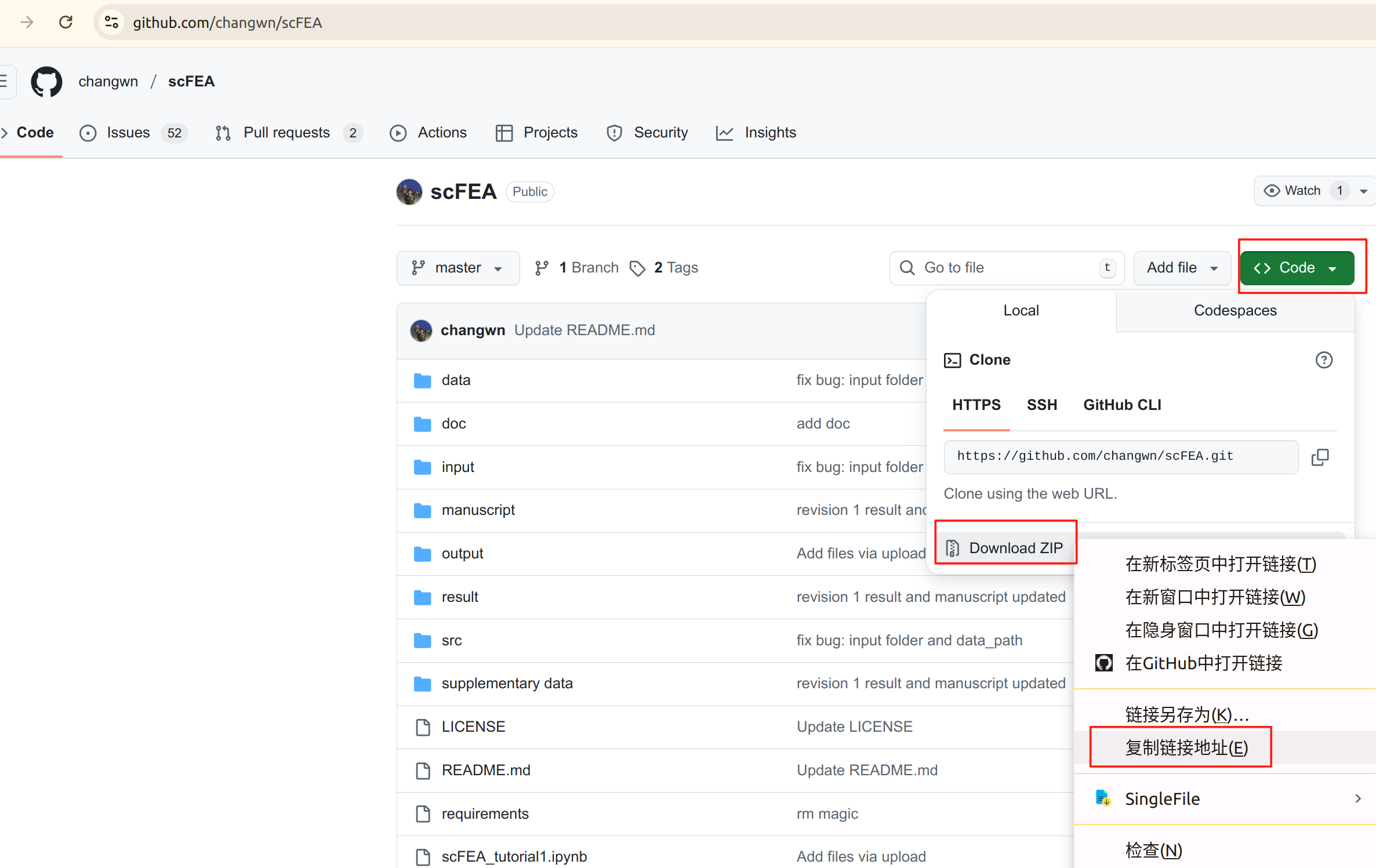
接下来开始使用wget和curl命令进行内容下载!
原始命令为:
wget https://github.com/changwn/scFEA/archive/master.zip
curl -O https://github.com/changwn/scFEA/archive/master.zip
同样,只需要在wget (curl) 与 https://github.com/changwn/scFEA/archive/master.zip 之间添加镜像地址 https://ghfast.top/ 即可
加速的完整命令:
wget https://ghfast.top/github.com/changwn/scFEA/archive/master.zip
#最新消息:新增镜像加速站https://gh-proxy.com,直接替换https://ghfast.top即可